Wednesday, December 4, 2024

Poe – Fast, helpful AI Chatbot


What is Poe?


Poe AI isn’t just another AI chatbot.


Think of it as your gateway to a collection of the most advanced AI models.


Poe brings together different AI models to provide diverse and powerful capabilities.


Want to brainstorm ideas? Get help writing? Or simply have an engaging AI chat?


Poe has you covered, all in one convenient platform.


Who Created Poe?


Poe AI is the brainchild of Adam D’Angelo, the former Chief Technology Officer & co-founder of Facebook.


Introduced in December 2022, Poe’s vision is to provide a platform where users can simply engage in back-and-forth conversations with a variety of AI bots, get instant answers to questions, and even create their own bot.


It aims to be the go-to hub for AI interactions, making powerful AI technology accessible and useful to everyone.


Top Benefits of Poe


A Wide Array of Bots: Poe isn’t limited to just one AI model. It provides access to a large selection of other bots with different strengths and specializations. You can find the perfect bot for every task.

Create Your Own Bots: Poe empowers users to create and customize their bots. Tailor an AI assistant that understands your unique needs and preferences.


Image Generation Capabilities: Poe isn’t just about text. It also includes powerful image generators like Stable Diffusion, allowing you to create stunning visuals with AI.


User-Friendly Interface: Even if you’re new to AI, Poe is easy to use. The interface is intuitive, making it simple for all Poe users to get started.


Free and Subscription Plans: Poe offers a free plan with limited access, as well as a paid subscription, unlocking unlimited usage and key features. This caters to both casual users and those who need AI assistance for their business plan.


Reviewed by: Fahim Joharder

Tuesday, November 26, 2024

Quicktools – Free AI services for text, images & designs generation


Quicktools from Picsart is a versatile set of online tools designed to enhance and simplify various creative tasks, particularly for users involved in graphic design, social media, and content creation. Here’s a review highlighting its main features and benefits:


Key Features

1.       User-Friendly Interface: Quicktools is designed for ease of use, making it accessible even for those who may not have extensive design experience. The straightforward layout allows users to quickly navigate through different tools.

2.       Variety of Tools: The platform offers a range of tools such as:

a.       Image Resizer: Easily adjust image dimensions without losing quality.

b.       Background Remover: Quickly remove backgrounds from images, a valuable feature for creating professional-looking graphics.

c.       Color Palette Generator: Automatically generates color schemes from uploaded images, which is great for maintaining consistent branding.

d.       Collage Maker: Simple options for creating collages with customizable layouts.

3.       Templates and Resources: Users have access to a library of templates for social media posts, flyers, and more, which can save time and inspire creativity.

4.       AI Tools: Incorporates AI-driven features for tasks like image enhancement and style transfer, which can significantly improve the quality of visuals with minimal effort.

5.       Integration with Picsart: Quicktools seamlessly integrates with other Picsart services, allowing users to enhance their projects or edit images further with advanced tools available in the main Picsart application.

Benefits

·         Time-Saving: The streamlined processes allow users to accomplish tasks quickly, which is particularly beneficial for busy content creators.

·         Accessibility: Being web-based, Quicktools can be accessed from any device with internet connectivity, making it convenient for on-the-go editing.

·         Cost-Effective: Many of the tools are free or offer a freemium model, making quality design accessible to individuals and small businesses.

Considerations

·         Limited Customization: While Quicktools is great for quick edits, more advanced users may find it lacking in deep customization options compared to full-fledged design software.

·         Internet Dependence: As an online tool, a stable internet connection is required, which might be a limitation in some situations.

Conclusion

Overall, Quicktools from Picsart is an excellent resource for anyone looking to perform quick and effective image editing and design tasks. Its user-friendly interface, variety of tools, and integration with the broader Picsart ecosystem make it a valuable asset for both novice and experienced creators.


Website: https://tools.picsart.com/

Thursday, November 14, 2024

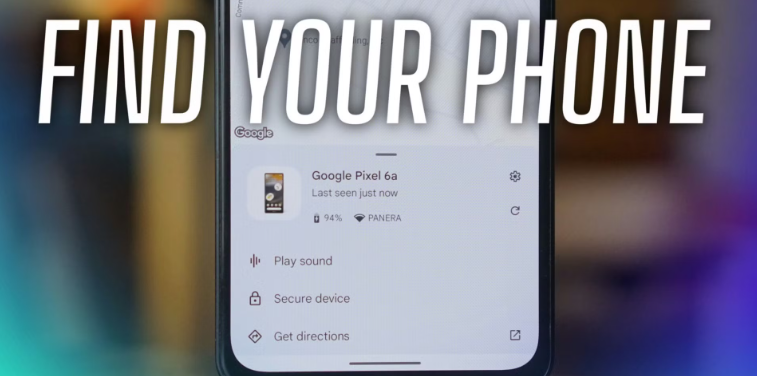
How to find lost phone?


If you've lost your phone, there are several methods you can use to try and locate it. Here’s a comprehensive guide for both Android and iPhone users:


For Android Phones


1.       Use Find My Device

o   Go to the Find My Device website: https://www.google.com/android/find

o   Sign in with the Google account linked to your device.

o   You’ll see the location of your phone on a map if it’s turned on and connected to the internet.

o   You can also use options to:

§  Ring the device: This will make your phone ring, even if it’s on silent.

§  Lock the device: Secure it with a new password.

§  Erase the device: This will delete all data, so use this as a last resort.

2.       Check Google Maps Timeline

o   Visit Google Maps Timeline: https://timeline.google.com/maps/timeline

o   If location history is enabled, you can check where your phone has been recently.


For iPhones


1.       Use Find My iPhone

o   Go to the Find My app on another Apple device or visit iCloud.com: https://www.icloud.com/find

o   Sign in with your Apple ID.

o   Select your device from the list. You’ll see its location on a map if it’s online.

o   Options available include:

§  Play Sound: This will make your iPhone ring.

§  Lost Mode: Lock your device and display a custom message with your contact number.

§  Erase iPhone: Permanently delete your data if you believe it’s lost for good.

Related Posts Plugin for WordPress, Blogger...